
- Published at
How I migrated billions of rows from CockroachDB 🪳 to PostgreSQL 🐘 to save ~75% on database costs
How I migrated 1.5 billion rows from CockroachDB to managed Postgres on Azure with only seconds of downtime — and cut our database bill by 75%.
- Authors
-
-
- Name
- Joachim Bülow
- Cofounder and CTO at Doubble
-
Table of Contents
- Introduction
- The goal
- No such thing as a coward’s way out
- CockroachDB has some nice tooling…
- Shared protocol, broken tooling
- What about a simple CSV export?
- What about managed migration solutions?
- Preparing for the migration
- Making our codebase compatible with both databases
- Getting a managed Postgres instance (a story)
- Our solution
- CockroachDB’s changefeeds
- Kafka vs. cloud storage
- Writing the migrator
- One worker per table
- Table introspection
- Dynamically built statements
- The blob consumption loop
- Non-trivial challenges
- The cutover
- Results
Introduction
A few weeks ago I was facing the daunting task of moving over 1TB of data in a live production system with many active users. We were migrating from CockroachDB to a managed PostgreSQL database running on Azure. There is no native or open-source tooling to move data between the two, so I was faced with a few interesting challenges.
The goal
Before starting, it is fair to assess the feasibility of the migration you need to perform. Our goal was a maximum of 8 hours of downtime, as we have many paying users who rely on our service. We set this target under significant uncertainty — initial research turned up very few articles or reports from others who had migrated from CockroachDB to Postgres.
No such thing as a coward’s way out
CockroachDB has some nice tooling…
Previously, when we have migrated cloud infrastructure, we have been able to rely on native tooling such as CockroachDB’s incremental backups for a seamless experience. Incremental backups offer a simple API: run a full backup while production is live, then take a fast sub-10-minute incremental backup before running an efficient system restore command.
No-hassle data migration!
Shared protocol, broken tooling
CockroachDB supports the Postgres wire protocol, which makes a lot of client-side tooling work out of the box. However, there are significant implementation differences between the two databases — CockroachDB extends plenty of functionality while also missing support for various Postgres features. This makes sense, since they are, by design and technology, two very different SQL databases.
The incremental backups mentioned above do not work for loading data into Postgres. The backup format is built to leverage the architecture of CockroachDB’s underlying Pebble storage engine — an engine entirely different from Postgres.
Likewise, the otherwise trusty pg_dump is not an option.
Cockroach Labs does maintain tooling to migrate from Postgres — but not to Postgres. Naturally.
What about a simple CSV export?
Not only would it take an incredibly long time to migrate billions of rows via CSV files.
Custom data types such as PostGIS values and nested JSON can also cause issues with the native COPY command — tricky to debug under time pressure.
On top of that, very long-running ingestions are prone to hanging, and you get limited visibility or control over the underlying process.
Imagine spending 24 hours migrating only to have the process quit and force a restart.
Pursuing this “simple” approach would not get us under 8 hours of downtime — more like days, probably — and would carry a high degree of risk.
What about managed migration solutions?
Solutions like FullConvert and Qlik Data Movement are cloud-based and claim to handle large migrations with ease.
Once again, paid, closed-source solutions suffer from several issues:
- Data integrity risk. We use PostGIS data, nested JSON, and other custom types. Without access to the source code, it is difficult to trust that edge cases are handled correctly.
- Cost. These tools are priced for large enterprises. As a startup, we are not in the business of throwing money around.
- Infrastructure overhead. Connecting your databases to a cloud migrator means opening private endpoints, configuring networking, and transferring all data over the internet — potentially slow.
- Speed. Reddit users reported throughput of roughly 10,000 rows per second. At that rate, migrating 1.5 billion rows would take over 41 hours.
Preparing for the migration
Making our codebase compatible with both databases
Before a single row could move, we had to make our backend compatible with standard PostgreSQL. CockroachDB encourages a number of convenient extensions to SQL that simply do not exist in Postgres:
AS OF SYSTEM TIME— used for time-travel queries and consistent reads. Postgres has no equivalent.UPSERT— CockroachDB’s shorthand for insert-or-replace. Replaced with standardINSERT ... ON CONFLICT DO UPDATE.- Row-level TTL — CockroachDB supports native TTL policies on tables. These had to be replaced with a scheduled cleanup job.
Going through the codebase and swapping these out was tedious but straightforward.
Getting a managed Postgres instance (a story)
With the code ready, we needed an Azure Database for PostgreSQL Flexible Server in the West Europe region — close to our other infrastructure.
Azure would not provision it.
After opening four support tickets, we were told it was “impossible” and were redirected to the UAE North or UK South regions instead. Eventually we traced the issue: our startup Azure subscription had apparently been flagged and blocked from provisioning high-contention compute. Creating a new paid subscription resolved it immediately.
A reminder that cloud infrastructure is not always just an API call away.
Our solution
CockroachDB’s changefeeds
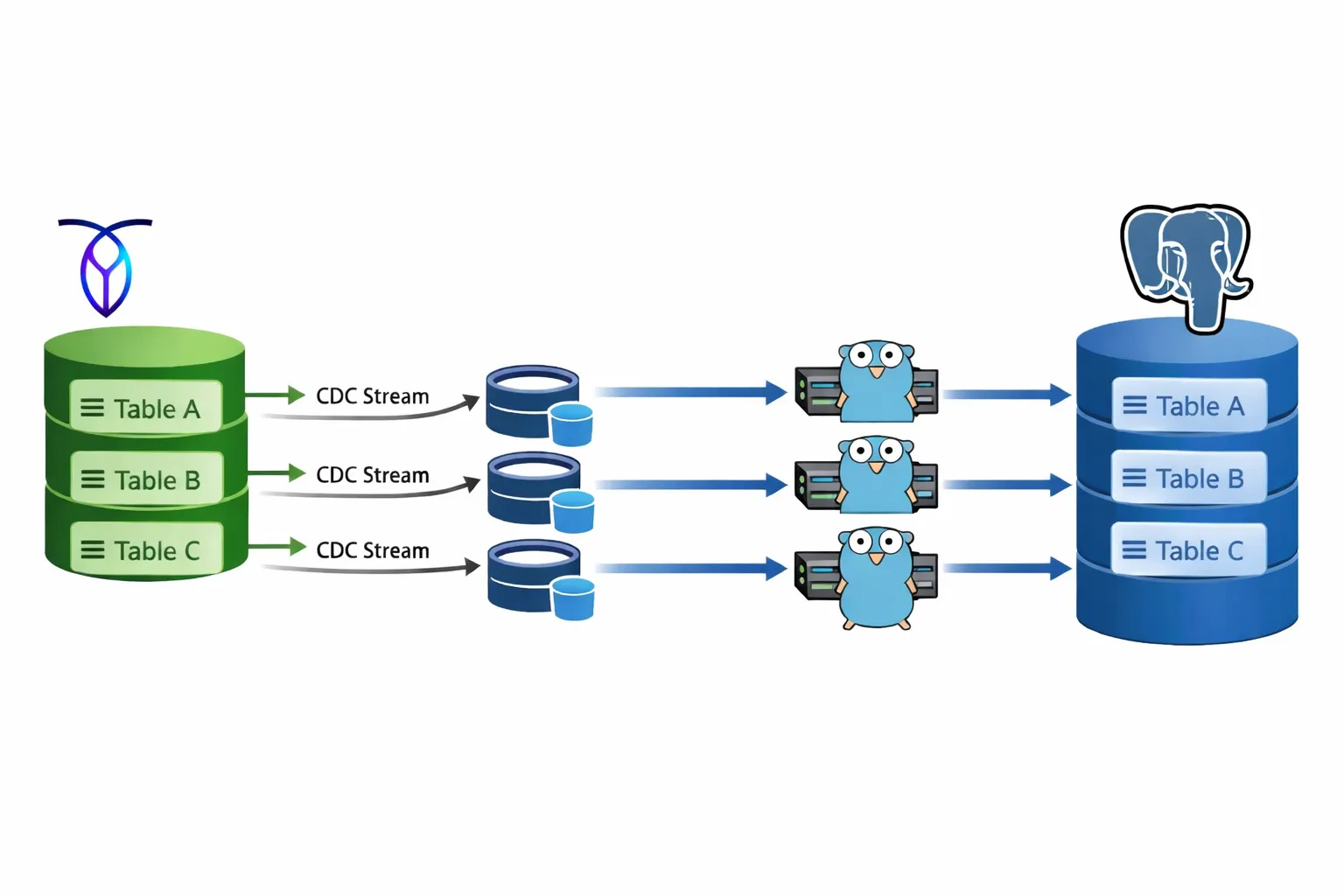
CockroachDB has a powerful Change Data Capture (CDC) feature built in. It is the same mechanism used under the hood by their own migration tooling, and it is recommended by Cockroach Labs for moving TB-scale datasets. It provides WAL-level replication into various sinks, including Apache Kafka and cloud storage.
CockroachDB supports a maximum of 80 concurrent changefeeds. We were migrating 83 tables. Close call.
Kafka vs. cloud storage
The natural choice for consuming changefeeds would be Kafka. Both Kafka and the changefeed protocol provide at-least-once delivery guarantees, which is exactly what you want for data integrity during a migration.
The problem with Kafka is the operational overhead. Running it ourselves on our Kubernetes cluster would have taken hours to set up. A managed Kafka service would have been expensive for a short-lived workload — many services price on peak ingress/egress, precisely the opposite of what we needed.
Instead, I settled on Azure Blob Storage as the sink. Each table would get its own container, closely mirroring the topic-per-table pattern from Kafka. We could write a custom consumer that processes objects gracefully — moving on only after each blob is fully processed and deleted.
Simple, cheap, and fully in our control.
Writing the migrator
One worker per table
The migrator is a generic, multi-threaded Go program. Each goroutine is responsible for exactly one table and its corresponding Azure Blob Storage container. All 83 workers run concurrently, giving us parallelism across every table from the start.
The key design goal was genericity — no table-specific code anywhere.
Table introspection
When a worker starts, the first thing it does is call LoadTableInfo, which queries PostgreSQL’s pg_catalog to discover the target table’s columns and primary key:
func LoadTableInfo(ctx context.Context, pool *pgxpool.Pool, schema, table string) (TableInfo, error) {
	cols := make(map[string]ColumnInfo)
	rows, err := pool.Query(ctx, `
SELECT
  a.attname,
  t.typname,
  pg_catalog.format_type(a.atttypid, a.atttypmod) AS formatted_type
FROM pg_catalog.pg_attribute a
JOIN pg_catalog.pg_class c ON c.oid = a.attrelid
JOIN pg_catalog.pg_namespace n ON n.oid = c.relnamespace
JOIN pg_catalog.pg_type t ON t.oid = a.atttypid
WHERE n.nspname = $1
  AND c.relname = $2
  AND a.attnum > 0
  AND NOT a.attisdropped
  AND a.attgenerated = ''   -- exclude computed columns
ORDER BY a.attnum
`, schema, table)
	// ... column scan ...

	pkRows, err := pool.Query(ctx, `
SELECT a.attname
FROM pg_catalog.pg_index i
JOIN pg_catalog.pg_attribute a
  ON a.attrelid = i.indrelid
 AND a.attnum = ANY(i.indkey)
JOIN pg_catalog.pg_class c ON c.oid = i.indrelid
JOIN pg_catalog.pg_namespace n ON n.oid = c.relnamespace
WHERE n.nspname = $1
  AND c.relname = $2
  AND i.indisprimary
ORDER BY array_position(i.indkey, a.attnum)
`, schema, table)
	// ... pk scan ...

	return TableInfo{
		Schema:  schema,
		Name:    table,
		Columns: cols,
		PK:      pk,
	}, nil
}
A few details worth noting:
- Computed columns are excluded. Attempting to insert a value into a generated column causes an error in Postgres, so the query filters them out with
a.attgenerated = ''. - Primary key columns are resolved in index order. This matters for building a correct
ON CONFLICT (pk1, pk2, ...)clause — the order must match the index definition.
Dynamically built statements
With the schema in hand, each worker builds its SQL statements once at startup and reuses them for every row it processes:
- An
INSERT INTO ... (col1, col2, ...) VALUES ($1, $2, ...) ON CONFLICT (pk) DO UPDATE SET col1 = EXCLUDED.col1, ...for upserts - A
DELETE FROM ... WHERE pk = $1for deletes
No hardcoded column names anywhere. The same migrator binary handles every one of the 83 tables.
The blob consumption loop
CockroachDB’s changefeed emits batches of row events as JSON blobs into the Azure Blob Storage container. Each JSON object represents a row, and its keys are ordered alphabetically — a guarantee provided by CockroachDB’s changefeed format. This makes column mapping deterministic: we can rely on key order to align values with our dynamically built parameter lists.
The worker loop looks like this:
- List all blobs in the container
- For each blob: download and parse the JSON rows
- Classify each row as an upsert or a delete
- Execute the corresponding statements in batches. E.g. all upserts then all deletes.
- Delete the blob from the container
- Repeat
The loop is idempotent by design — if a worker crashes mid-blob and restarts, re-processing the same blob produces the same result in Postgres. The changefeed’s at-least-once delivery guarantee combined with idempotent upserts means no data is ever lost or corrupted.
At peak, the sync engine was processing over 100,000 rows per second across all workers.
Non-trivial challenges
No migration at this scale is without surprises. A couple of things that needed careful handling:
- Geo-data formatting. CockroachDB serializes geometry values differently from what PostGIS expects. We had to add a conversion step inside the worker to reformat geometry strings before passing them to the insert statement.
- Data validation. After the initial sync stabilized, we ran row-count checks across all tables and wrote a script to spot-check data integrity on the major ones. Rather than scanning from the start, the script used UUID-based offset sampling — querying with a known primary key anchor and a large offset, e.g.
SELECT * FROM chat WHERE id > '<uuid>' OFFSET 120000 LIMIT 10— and compared the results between CockroachDB and Postgres. This let us validate deep into large tables without full scans, leveraging the primary key index on both sides.
The cutover
Once the sync engine had replicated all historical data and was keeping pace with live writes in real time, we were ready to cut over.
- We closed all inbound traffic to CockroachDB.
- We waited a few seconds for the final changefeed blobs to drain and be consumed by the workers.
- We updated our connection strings to point to the new PostgreSQL instance and reopened traffic.
Total user-facing downtime: a few seconds.
Results
The migration delivered exactly what we set out to achieve: Building the sync engine from scratch was more work than reaching for a managed tool, but it gave us full control, full transparency, and the confidence that our data arrived correctly.
If you are facing a similar migration, the key insight is: CDC changefeeds + idempotent workers + cloud storage is a surprisingly robust and cost-effective pattern.